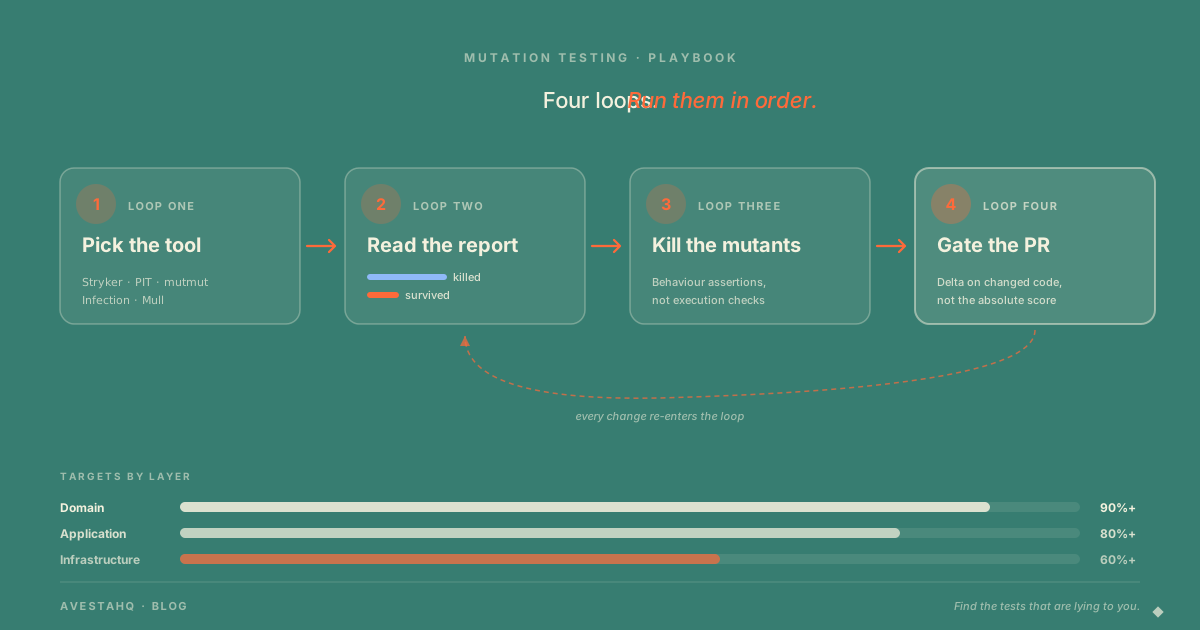
The mutation testing playbook has four operating loops. Pick a tool that matches your stack and integrates with your existing test runner. Read the report by mutant state — Killed, Survived, NoCoverage, Timeout — not just the headline percentage. Kill surviving mutants by replacing execution checks with behaviour assertions. Make it fast enough to gate every pull request through incremental analysis, test selection, and parallel execution. Most teams stop at "what is mutation testing." This is what comes after.
The first time we ran mutation testing on a 200,000-line production codebase, the score came back at 14%. A team with 78% line coverage, a culture of code review, and a clean CI pipeline. Six months later that same codebase scored 87% on its critical paths — without writing dramatically more tests, and without rewriting the system. What changed was not the test count. It was the operating loop.
Most posts about mutation testing stop at "your tests are probably decorative." We wrote one of those. It is the awareness pass — the punch in the face that gets a team to take test effectiveness seriously. The reaction is almost always the same: yes, of course, we should run mutation testing. Then nothing happens. The team does not run it because nobody handed them the playbook. This is that playbook.
The 88% Post Left Out the Hard Part
The argument for mutation testing is short. Coverage measures whether a line ran. Mutation score measures whether a test would catch a bug introduced into that line. The first number is decorative. The second is verification.
The argument is easy. The operations are not. What killed every previous attempt at mutation testing on real codebases — across hundreds of teams we have observed — was never the concept. It was that nobody knew which tool to pick, what the report meant, which surviving mutants to fix first, or how to keep the run under an hour so it could ride along with CI instead of being a quarterly project that nobody owns.
There are four loops. Run them in order. Each one has a known set of failure modes. Once they are running together, mutation score becomes a routine signal — not a heroic project.
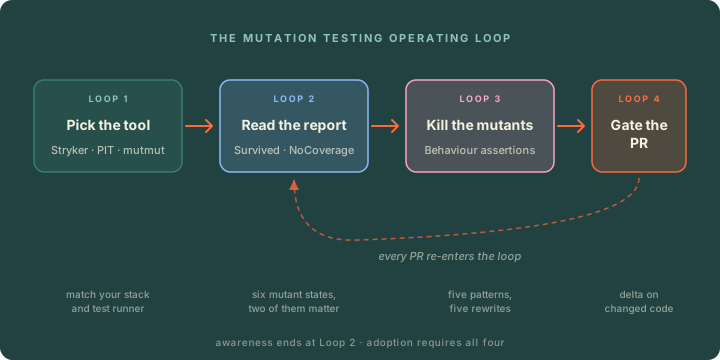
Figure 1: The mutation testing operating loop. Each stage has known failure modes; running them in sequence is what separates teams that adopt mutation testing from teams that try it once.
Loop 1: Pick the Tool
Match the tool to your stack and your test runner. Speed of the inner loop matters more than the precise set of operators. A tool that runs your tests the way you already run them will be used; a tool that needs a separate runner will be abandoned the first time CI gets slow.
| Stack | Tool | Notes |
|---|---|---|
| JavaScript / TypeScript | Stryker | Mature, integrates with Jest, Vitest, Mocha, Karma. Default starting point. |
| Java / Kotlin | PIT (Pitest) | The reference implementation. JVM bytecode mutation, fast. |
| Python | mutmut, Cosmic Ray | mutmut is simpler; Cosmic Ray has stronger configuration. |
| PHP | Infection | The standard, Composer-installable. |
| C# / .NET | Stryker.NET | Same engine family as Stryker. |
| C / C++ | Mull | LLVM-based; slower setup, mature. |
| Go | go-mutesting, ooze | Less mature; expect to read source. |
Two configuration choices matter on day one and never again.
Scope. Do not run mutation testing on the whole codebase first. Pick three to five files in your highest-risk module — the discount calculator, the authentication checker, the data migration runner — and configure the tool to mutate only those. A focused first run completes in minutes; a whole-codebase first run takes hours, finishes after the team has gone home, and gets ignored.
Operator set. Every mutation tool ships dozens of operators (boundary, conditional, return-value, statement-deletion, increments). Default sets are good. Resist the urge to disable operators because they are "noisy" — most of the noise is signal you have not learned to read yet.
A starter Stryker config that has worked across dozens of projects:
// stryker.conf.js
module.exports = {
  mutate: ['src/domain/**/*.ts'],
  testRunner: 'jest',
  reporters: ['html', 'progress', 'dashboard'],
  thresholds: { high: 80, low: 60, break: 50 },
  concurrency: 4,
  incremental: true,
  incrementalFile: '.stryker-tmp/incremental.json',
};
That config does three things at once: scopes mutation to the domain layer, sets a hard break threshold so CI fails when the score drops, and turns on incremental analysis so subsequent runs only re-mutate changed files. Almost every other knob can stay on the default.
Loop 2: Read the Report Right
A mutation report is not a single percentage. It is a histogram of mutant outcomes, and learning to read the histogram is half the playbook.
Six states show up across every tool, with names that vary slightly:
- Killed — at least one test failed when the mutant ran. Good. Move on.
- Survived — every test passed despite the mutant. This is a real gap. Spend your time here.
- NoCoverage — no test ever executed the mutated line. Coverage is the missing layer; mutation testing cannot help until tests touch the code at all.
- Timeout — the mutant caused tests to run forever, usually because mutating a loop condition created an infinite loop. Counted as killed by most tools and treated as a sign that the test would have failed.
- RuntimeError — the mutant produced an exception unrelated to the test. Treat as killed unless they cluster on a single file, which signals a tooling issue.
- CompileError — the mutated code does not compile. Tooling artifact; ignore unless the rate is high, which means the operator set is misconfigured for your dialect.
The first time you read a report, sort by state and look at Survived first. Then NoCoverage. Everything else is noise on the first pass.
The headline mutation score most tools display is killed / (killed + survived). Some tools also report a "mutation score covered" that excludes NoCoverage from the denominator. Pick one and stick with it. The covered version is more honest about test effectiveness; the uncovered version is more honest about overall safety. Display both internally. Track the trend, not the absolute.
Loop 3: Kill the Surviving Mutants
This is the loop where teams improve. A surviving mutant is the tool telling you, with high specificity, exactly which behaviour your tests do not verify. There are five patterns it will surface again and again. Each pattern has a corresponding test rewrite — usually no longer than five lines — that kills the mutant and a class of similar future bugs.
Pattern 1: Boundary mutants. The tool changes >= to > or < to <=. The test passes because the boundary value was never tested.
// Production
function isEligible(age: number): boolean {
  return age >= 18;
}

// Test that lets the mutant survive
test('eligible at 25', () => {
  expect(isEligible(25)).toBe(true);
});

// Test that kills it
test.each([
  [17, false],
  [18, true], // the boundary itself
  [19, true],
])('isEligible(%i) returns %s', (age, expected) => {
  expect(isEligible(age)).toBe(expected);
});
Pattern 2: Conditional negation. The tool flips == to != or && to ||. The test only exercised one branch.
The fix is symmetrical: every conditional needs at least one test for the true case and one for the false case. Table-driven tests catch this almost for free.
Pattern 3: Return-value mutants. The tool replaces return x with return null, return undefined, or return 0. The test asserted that the function ran, not what it returned.
This is the decorative test in its purest form: expect(result).toBeDefined(). The kill is to assert on the actual value — and ideally on the relationship between the input and the output, not just the output in isolation.
Pattern 4: Math and operator mutants. The tool changes + to -, * to /, or removes a unary minus. The test used numbers where the bug happens to produce a coincidentally-equal answer (2 + 2 == 2 * 2). Choose test inputs where every operator produces a distinct result.
Pattern 5: Statement deletion. The tool removes a function call entirely — usually a side-effect call like a logger, a metrics emit, or a database write. The test never observed the side effect, so the deletion goes unnoticed. The kill is to assert on the side effect: the spy was called, the row was written, the event was emitted. If you cannot observe the side effect, you cannot verify it — and the test cannot tell you whether the call was supposed to happen at all.
The pattern across all five: replace execution checks ("the code ran without throwing") with behaviour assertions ("the code produced this specific outcome for this specific input"). Mutation testing is the most reliable way to find tests that have drifted from the second to the first.
Loop 4: Make It Fast Enough to Gate Every Pull Request
Mutation testing has a reputation for being slow. The reputation is deserved if you run it the way you run unit tests — on every file, with every operator, on every commit. Run it that way and a 5-minute test suite turns into a 3-hour mutation run. The team will not wait for that. Three techniques compound to take it back to a CI-friendly window.
Incremental analysis. Every mutation tool worth using supports it. The tool stores the mutant catalog from the last full run; on subsequent runs it only mutates files that changed and only re-runs tests for those mutants. A 3-hour full run becomes a 4-minute pull-request run.
Test selection. When mutating src/domain/discount.ts, you do not need to run the entire test suite — only the tests that import that file or import something that imports it. Most modern test runners support this directly (Jest's --findRelatedTests, Vitest's --related). Couple it with mutation tooling and the inner loop accelerates again.
Parallelization. Mutants are embarrassingly parallel. A single CI runner with eight cores can mutate eight files simultaneously, and most tools handle this with one config flag. For larger codebases, sharding mutants across multiple CI runners turns wall-clock time into runner-cost — which is almost always the better trade.
The combination of the three brings mutation testing into the same time budget as a slow unit test suite. Once it is fast enough to run on every pull request, you can put a gate on it.
The right gate is delta-based, not absolute. An absolute gate ("the project must be at 80%") is brittle on legacy code — a single touched file can drag the average down and block an unrelated change. A delta gate ("the score on changed code must be at least the threshold for that layer") rewards new code that is well-tested, never blocks a small change to a poorly-tested area, and prevents quality regression where the team is actually working. Stryker's --since flag and PIT's historyInputLocation/historyOutputLocation both support this directly.
The Equivalent Mutant Trap
Sooner or later, somebody on the team will say: "this mutant cannot be killed — it is equivalent to the original." An equivalent mutant is a code change that produces identical observable behaviour. They are real, and they cannot be killed by any test, because they are not bugs.
They are also rarer than people claim. In our experience, less than 5% of surviving mutants on a real codebase turn out to be genuinely equivalent. The label is over-applied because acknowledging "this is a real gap" requires writing a test, and labelling something equivalent does not.
A surviving mutant is genuinely equivalent only if you can articulate, in one sentence, why every observable behaviour is identical — and that sentence holds across all callers. Most "equivalent" claims fall apart on the second sentence. The mutant changed the order of two independent operations? Probably equivalent. The mutant flipped a null check on a parameter the caller already validated? Probably not — the redundant check exists because the caller used to not validate, and the test should pin that intent. The mutant removed a Math.floor from a function returning currency? Definitely not equivalent in a system that handles money.
Mark the genuinely equivalent ones with a comment in your tool's ignore file (@SurvivingMutant Equivalent: … with a one-line reason). Audit the ignore file quarterly. The audit is cheaper than letting the list grow.
Targets That Actually Work
Uniform mutation score targets across a codebase are the same anti-pattern as uniform coverage targets, just at a higher level of sophistication. Different layers warrant different bars.
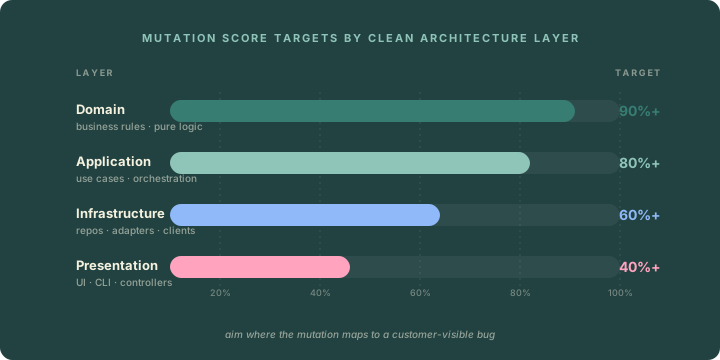
Figure 2: Targets that scale with the cost of a missed mutation. Domain logic warrants the highest bar because a bug in the discount calculator is a bug in production.
Domain code — pure business rules, calculators, validators, state machines — should clear 90%. The cost of a surviving mutant is a real bug in real money or real safety, and the code is pure enough that mutations correspond cleanly to behaviours.
Application code — use cases that orchestrate domain logic and external systems — should clear 80%. The remaining 20% is where surviving mutants are largely about logging, metrics, and orchestration order that does not change observable outcomes.
Infrastructure code — repositories, HTTP clients, queue adapters — clears 60% on a good day. Many of these mutations are about retry logic and error mapping that a contract or integration test will catch better than a unit-level mutation.
Presentation code — UI, CLI, controllers — sits at 40%+. Mutations on rendering and routing rarely correspond to real bugs that a customer notices, and the cost-to-benefit ratio of pushing higher is worse than spending the time on the layers that warrant it.
A team holding 80% across Domain and Application while shipping every day is in a fundamentally stronger position than a team chasing 95% everywhere. Aim where the mutation maps to a customer-visible bug, and accept lower numbers where it does not.
Five Ways Teams Fail at Mutation Testing
Across teams that adopt mutation testing and abandon it within a quarter, the failure modes cluster.
Chasing 100% across the codebase. Mutation score has a non-linear cost curve. Every percentage point past 90% on Domain code costs roughly twice the previous one. Teams that try to hit 95% everywhere burn out, and the team that comes after them deletes the mutation testing config. Set tiered targets and stop.
Running it once, never again. A single mutation run is a useful awareness exercise and nothing more. The score is only valuable as a trend line. Make it part of CI on day one or do not start.
Treating equivalent mutants as victories. A surviving mutant that you mark as "equivalent" so you can move on is a test gap with a sticker on it. Be ruthless about the criterion: one sentence, holds across all callers, otherwise it is real.
Heavy mocking that hides mutations. Tests that mock the unit under test cannot detect mutations of that unit, because the mock returns whatever you told it to. If the mutation testing report shows almost no Survived mutants in a heavily-mocked area, the report is not flattering — the tests are bypassing the code being mutated. Fewer mocks, more real execution.
Adopting without a gate. A mutation score that is reported but does not block anything is a vanity metric. The score will drift down over months as new tests get written to satisfy coverage rather than verification. Gate the score on changed code, fail the build below the layer's threshold, and let the gate do the work that conversations cannot.
The Bottom Line
Mutation testing is not a one-time audit. It is a feedback loop, and the discipline is in the iteration. The four loops — pick the tool, read the report, kill the surviving mutants, gate the pull request — are not difficult individually. What separates teams that adopt mutation testing from teams that try it is whether all four loops are running together by the end of the first month.
Coverage measures execution. Mutation score measures verification. The first number is what your dashboard shows. The second is what your test suite is actually worth.
Run the loops. The score will tell you the rest.


