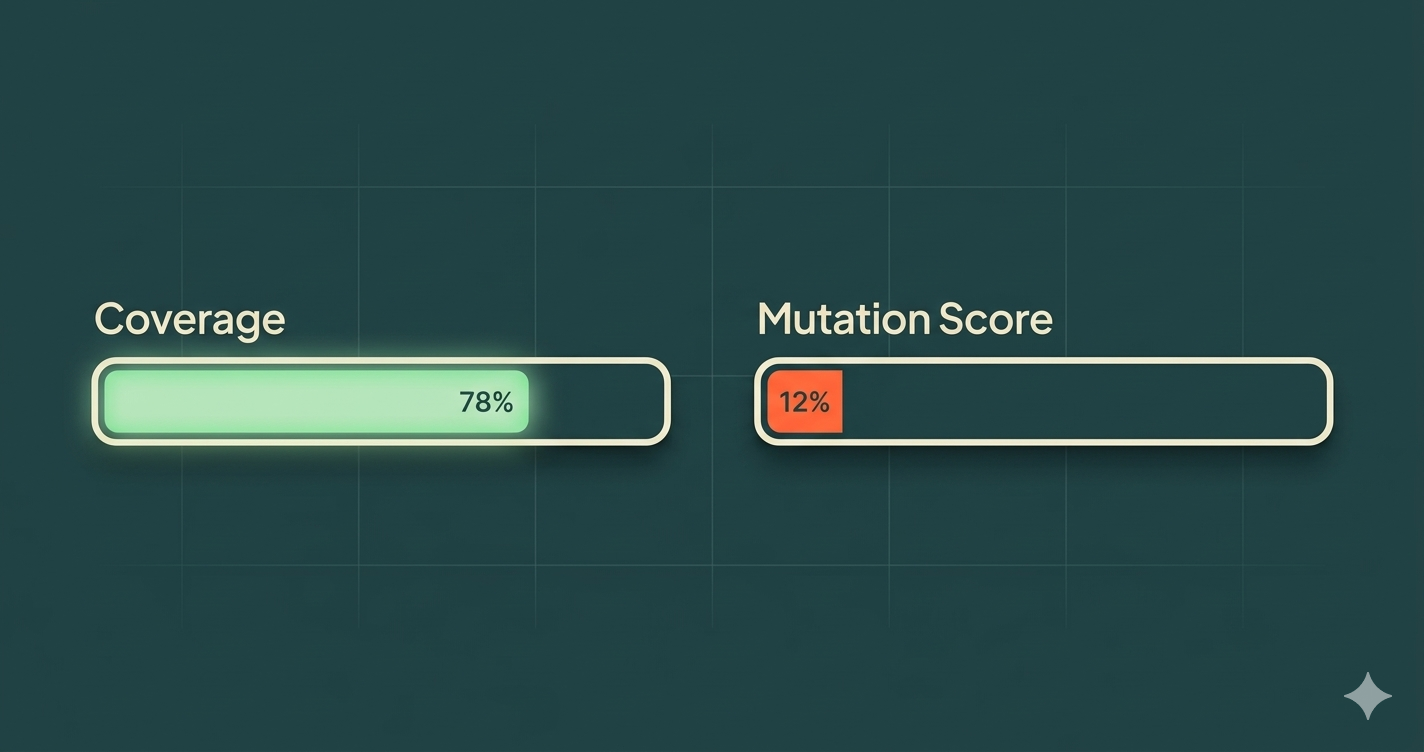
Mutation testing reveals that most test suites are "decorative" — tests that pass whether the code is correct or not. By introducing small changes to production code and checking whether tests catch them, mutation testing measures actual test effectiveness. Most enterprise codebases discover that 80-90% of their tests are decorative on their first run.
Your test suite is green. Coverage is at 78%. The CI pipeline hasn't failed in weeks. Everything looks healthy.
But what if you deleted half your production code and the tests still passed?
That's not a hypothetical. Run mutation testing on a typical enterprise codebase and that's exactly what you'll find. The tests aren't testing anything. They're decoration.
What Makes a Test "Decorative"
A decorative test is a test that passes regardless of whether the code under test is correct. It exists in your test suite, it contributes to your coverage number, it shows green in your CI pipeline — but it doesn't actually verify that the software works.
Here's a simple example:
// Production code
function calculateDiscount(price: number, tier: string): number {
  if (tier === 'premium') return price * 0.2;
  if (tier === 'standard') return price * 0.1;
  return 0;
}

// Decorative test
test('should calculate discount', () => {
  const result = calculateDiscount(100, 'premium');
  expect(result).toBeDefined(); // passes even if result is wrong
});
This test executes the function and checks that it returns something. It would pass if the function returned 0, 100, -5, or NaN. It covers the line. It shows green. It verifies nothing.
The Five Patterns of Decorative Tests
After analyzing hundreds of test suites, we see five patterns that produce decorative tests consistently.
1. Assertion-free tests
Tests that call functions but never assert meaningful outcomes. They verify the code runs without throwing, not that it produces correct results.
test('should process order', async () => {
  const order = createTestOrder();
  await processOrder(order); // no assertion on what happened
});
2. Tautological assertions
Tests that assert on values they themselves created, not on behavior the production code produced.
test('should create user', () => {
  const user = { name: 'Alice', role: 'admin' };
  expect(user.name).toBe('Alice'); // tests the test, not the code
});
3. Over-mocked tests
Tests where every dependency is mocked so the production code never actually executes. The test verifies the mock behavior, which is whatever you told it to return.
test('should get user profile', () => {
  const mockRepo = { findById: jest.fn().mockReturnValue({ name: 'Alice' }) };
  const service = new UserService(mockRepo);
  const result = service.getProfile('123');
  expect(mockRepo.findById).toHaveBeenCalledWith('123'); // verifies the mock was called, not that the logic works
});
4. Snapshot tests on unstable structures
Snapshot tests on large objects or rendered components that change frequently. Teams approve snapshot updates without reviewing them, making the test a rubber stamp.
5. Happy-path-only tests
Tests that only verify the success case, never error handling, boundary conditions, or edge cases. The production code's error paths are completely untested.
Why Coverage Metrics Lie
Code coverage answers one question: "Was this line executed during testing?" It does not answer: "Was the behavior verified?"
Consider this:
function isEligible(age: number, score: number): boolean {
  return age >= 18 && score >= 70;
}

test('should check eligibility', () => {
  isEligible(25, 80); // 100% coverage, zero assertions
});
Coverage: 100%. Test effectiveness: 0%. The function could return true, false, undefined, or throw an error — the test would still pass.
This is why organizations with 80%+ coverage still ship bugs constantly. Coverage measures execution, not verification. It's the equivalent of measuring how many pages of a book someone turned, not how many they actually read.
How Mutation Testing Works
Mutation testing closes the gap between coverage and effectiveness. Here's the process:
-
Mutate: The tool makes a small change to your production code (a "mutant"). For example, changing
>=to>, replacingtruewithfalse, or deleting a function call. -
Run tests: The test suite runs against the mutated code.
-
Evaluate: If a test fails, the mutant is "killed" — your tests caught the change. If all tests pass, the mutant "survived" — your tests didn't notice the code changed.
-
Score: Your mutation score is the percentage of mutants killed. A score of 88% means your tests would catch 88% of potential bugs.
Mutation Score = (Killed Mutants / Total Mutants) × 100
The mutations simulate real bugs — the kinds of mistakes a developer (or an AI agent) might actually make. If your tests can't catch a simulated bug, they can't catch a real one either.
The AI Agent Connection
This matters more now than ever because of AI coding agents.
An AI agent's primary feedback loop is your test suite. When an agent generates code, it runs the tests. If they pass, it moves on. If they fail, it adjusts. The test suite is the agent's definition of "correct."
When your test suite is decorative, the agent has no real feedback. It generates code, runs decorative tests, sees green, and ships. The code might be wrong in a dozen ways, but the tests won't tell the agent — or you.
This is why the 2025 DORA Report found that AI adoption correlates with higher instability. It's not that AI agents write bad code. It's that most test suites can't tell the difference between correct code and incorrect code. The agent just amplifies whatever the tests allow.
Fix the tests, and you fix the agent. It's that simple and that hard.
Where to Start: A Practical Approach
You don't need to mutation-test your entire codebase on day one. Start where the risk is highest.
Step 1: Identify critical paths
Pick the 3-5 business flows where a bug would cost the most — payment processing, user authentication, core data transformations. These are your mutation testing targets.
Step 2: Run mutation testing on those paths
Use a mutation testing tool appropriate for your stack (Stryker for JavaScript/TypeScript, PIT for Java, mutmut for Python). Expect a shock — most teams score 10-20% on their first run.
Step 3: Kill the surviving mutants
Each surviving mutant tells you exactly what your tests aren't verifying. Write targeted tests that catch those specific mutations. Focus on behavior assertions — what the code should do, not how it's structured.
Step 4: Set a quality gate
Once your critical paths reach 60%+ mutation score, add mutation testing to your CI pipeline as a quality gate. New code that drops the mutation score below the threshold doesn't merge.
Step 5: Expand gradually
Move outward from critical paths to secondary flows. You don't need 90% across the entire codebase — you need high effectiveness where it matters most.
The Payoff
Teams that adopt mutation testing consistently report:
- Fewer production incidents — tests actually catch bugs before deployment
- Faster code review — reviewers trust the test suite, so reviews focus on design, not correctness
- More effective AI agents — agents get real feedback from tests that actually verify behavior
- Higher confidence in refactoring — teams change code knowing the tests will catch regressions
The investment is real — mutation testing takes time and forces you to write better tests. But the alternative is maintaining a decorative test suite that gives you false confidence while bugs ship to production.
The Bottom Line
Your test suite's job is to catch bugs. If it can't catch a simulated bug (a mutation), it can't catch a real one. Coverage tells you how much code ran during testing. Mutation score tells you how much code is actually verified.
Most teams discover that the number is much lower than they thought. That's not a failure — it's the start of building a test suite that actually works.
The question isn't "What's your coverage?" It's "What's your mutation score?"


